Organic Light Emitting Diode graphic display
I2C.SPI, look into spi.oled.AdafruitSSD1306.java
The board we are talking about here is the Monochrome 128x32 OLED graphic display.
It uses SPI.
|
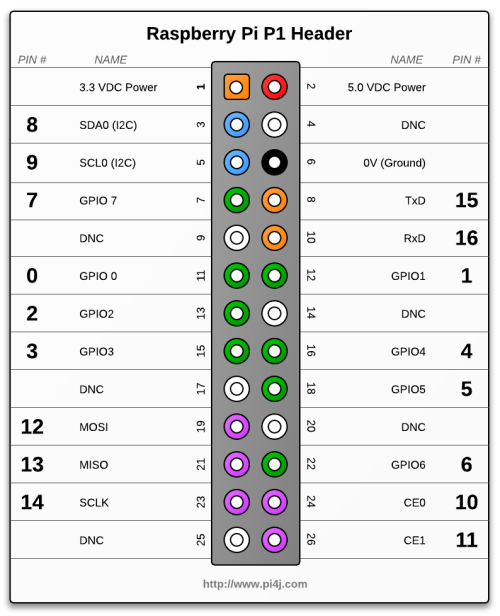
|

|
||||||||||||||||||||||||
spi.oled.AdafruitSSD1306) accordingly.
spi.oled.AdafruitSSD1306)spi.oled.ScreenBuffer)spi.oled.utils.CharacterMatrixes )spi.oled.OLEDSSD1306Sample. Run it from a script like this:
 #!/bin/bash
 PI4J_HOME=/home/pi/pi4j/pi4j-distribution/target/distro-contents
 CP=./classes
 CP=$CP:$PI4J_HOME/lib/pi4j-core.jar
 sudo java -cp $CP spi.oled.OLEDSSD1306Sample
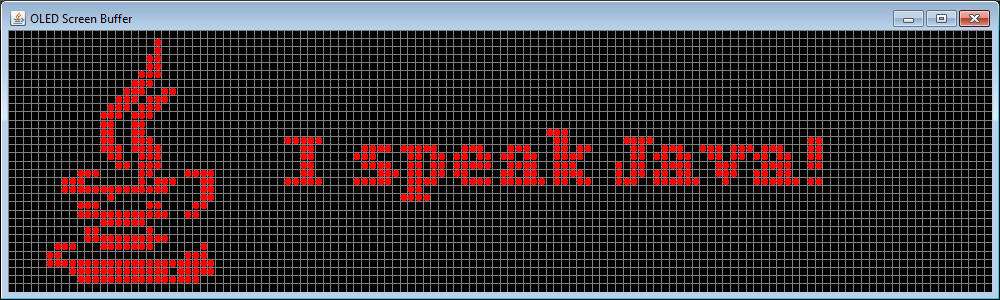
The output would look like this:

"I speak Java!"
spi.oled.OLEDSSD1306Sample also illustrates the available features - more exhaustively. It will show how to display a string at a given location, plot pixels, draw lines, rectangles, shapes, display images, make an horizontal marquee, a vertical one, etc.
    AdafruitSSD1306 oled = new AdafruitSSD1306();     01

    oled.begin();                                     02
    oled.clear();

    ScreenBuffer sb = new ScreenBuffer(128, 32);      03
    sb.clear();

    sb.text("ScreenBuffer", 2, 8);                    04

    sb.dumpScreen();                                  05

    oled.setBuffer(sb.getScreenBuffer());             06
    oled.display();

    // ...

    oled.shutdown();                                  07
| 01 |
Initialize the AdafruitSSD1306 object.
This is the one you will refer to to display anything, or erase the screen. |
| 02 |
begin will make it ready to be used.
clear resets it.
|
| 03 |
The ScreenBuffer represents the screen - its pixels actually - to be displayed.
Here 128 and 32 represent the width and height of the screen, in pixels. The clear method turns off all its pixels.
|
| 04 |
This is where you "write" something on the screen.
There are several such methods. text, plot, line, image, etc. See the code of the ScreenBuffer class for details.
In this case, the string "ScreenBuffer" will be displayed on the screen, the left of the string will be 2 pixels from the left of the screen, the bottom of the string will be 8 pixels from the top of the screen. |
| 05 |
This one is to be used for debugging.
It spits out on the standard output the content of screen as it is when you invoke this method. |
| 06 |
This needs some comments.
The getScreenBuffer method on the ScreenBuffer object does two things:
setBuffer is invoked on the AdafruitSSD1306, to push the buffer on the device.
Then the display method is invoked, this is the one actually displaying the recently pushed buffer on the screen itself. It tuns the screen's leds on and off, accordingly to the content of the screen buffer.
|
| 07 |
This is the counterpart of the begin method.
Free the resources when you are done, before ending the program. |
spi.oled.utils.ImageBuilder.
doYourJob().
"I speak Java!"